Positions
The Positions window shows current and tracked positions across trading connections: the position volume, price, leverage and margin, liquidation price, stop loss, take profit, PnL, fee, funding, and total financial result.

Columns
| Column | Description |
|---|---|
| Connection | Trading connection. |
| Symbol | Position symbol. |
| Price | Position price or average price. |
| Qty | Position volume. |
| Leverage | The symbol’s leverage and margin mode on the exchange, for example 10x Cross or 5x Isolated. Empty for spot, MOEX, and when the exchange did not report the leverage. Changed with the Leverage and margin command. |
| Margin | Margin of the open position in the margin currency (for example, USDT): for isolated — the margin allocated by the exchange, for cross — the initial margin, that is the position value divided by the leverage. Empty if there is no position or the leverage is unknown. |
| Take profit | Take profit level. |
| Stop loss | Stop loss level. |
| Liquidation | The price at which the exchange will force-close the position. Empty if there is no position or the exchange did not report the price. In cross margin it depends on the balance and other positions, so it is updated with a small delay. |
| Unrealized PnL | Unrealized result of the open position. |
| Realized PnL | Realized result. |
| Commission | Fee for the position or operations. |
| Net PnL | Total financial result: Unrealized PnL + Realized PnL − Commission + Funding. |
| Account | Trading account of the position. |
| Funding | Perpetual futures funding of the position: ”+” — received, ”−” — paid. Colored by sign. |
| Leg | The position leg in hedge mode: LONG or SHORT. Empty for a position in one-way mode. |
The Leverage, Margin, and Liquidation columns are filled for futures on connections that provide this data (see the list in Leverage and margin).
Negative values are usually shown in red. This helps you quickly spot losing positions or a negative financial result.
Context menu
Right-click a position row to open the context menu.
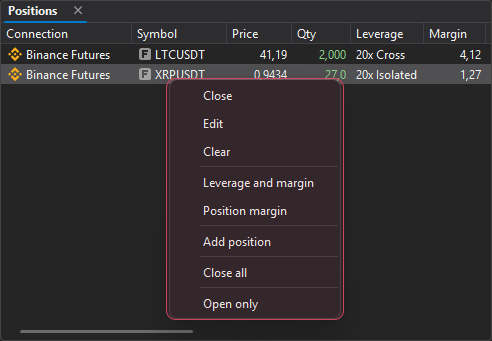
| Command | Description |
|---|---|
| Close | Closes the selected position at market. |
| Edit | Changes the price or volume of the selected position. |
| Clear | Removes the selected position from the terminal. |
| Leverage and margin | Opens the Leverage and margin window for the position symbol. Available only for futures on connections that can change the leverage. |
| Position margin | Opens the Position margin window: add or remove margin of an isolated position. Available only for open isolated positions on connections that support it. |
| Add position | Opens the manual position entry window (Position). |
| Close all | Closes all positions at market. Before closing, the terminal asks: “Close all positions?”. |
| Open only | Shows only open positions. |
Manual position entry
The Add position command opens the manual position entry window.
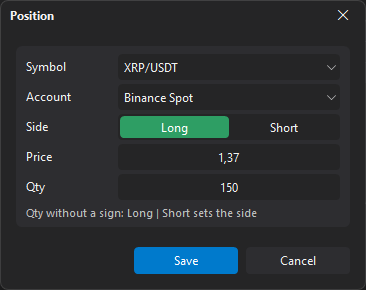
| Parameter | Description |
|---|---|
| Symbol | Position symbol. |
| Account | Account to which the position belongs. |
| Side | Long or Short. |
| Price | Position price. |
| Qty | Position volume, without a sign: Long or Short sets the side. |
Until the symbol, account, price and qty are set, the position cannot be saved: the reason is shown under the fields, for example “Select an account” or “The price must be above zero”. If the symbol has no account, the window says “No account for the symbol: connect its exchange”.
The Edit command opens the same window for the selected position. The symbol and account are shown there but cannot be changed; for a position leg in hedge mode, the side cannot be changed either.