Order book tab
On the Order book tab you set how volumes look in the window and which orders stand out: large volumes, icebergs, orders whose appearance should trigger a sound alert. This helps you notice what matters in the order book faster.
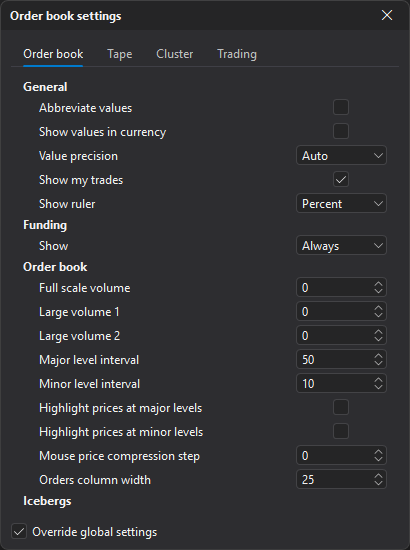
The tab has five blocks: General, Funding, Order book, Icebergs and Alert.
General
| Parameter | Description |
|---|---|
| Abbreviate values | Abbreviated volumes in the order book, tape and clusters: 1000 — 1K, 5000 — 5K, 10,000 — 10K, etc. |
| Show values in currency | Volumes in the order book, tape and clusters are shown in the quote currency instead of the symbol quantity. |
| Value precision | Number of decimal places in volume values. Auto — the symbol’s volume precision. |
| Show my trades | Shows markers with the volume of your executed trades. |
| Show ruler | Ruler at the cursor: the distance from the best price to the price under the cursor in percent, points or ticks. None — off. |
Funding
The funding chip of a perpetual futures contract on the order book info panel: the rate, the time to funding and, with an open position, the expected payment and the accrued amount.
| Parameter | Description |
|---|---|
| Show | When to show the chip: Always (default), By thresholds or None. |
| By thresholds: rate from, % | For the By thresholds mode: the chip is shown if the absolute rate is at least this value. From 0 to 100, step 0.01. 0 means no condition. |
| By thresholds: minutes to funding | For the By thresholds mode: the chip is shown if no more than this many minutes are left to funding. From 0 to 1440. 0 means no condition. |
In the By thresholds mode, both conditions must be met.
Order book
| Parameter | Description |
|---|---|
| Full scale volume | Volume at which an order book histogram bar is filled completely. At 0 the scale is fitted automatically to the average order book volume. |
| Large volume 1 (2) | Volume from which a row is highlighted with the large volume 1 (2) color from the order book theme. At 0 the threshold is calculated automatically from the average volume and the coefficients in the global order book settings. |
| Major level interval | Step of the major grid lines in order book rows (price steps with compression). At 0 the lines are not shown. |
| Minor level interval | Step of the minor grid lines in order book rows. At 0 the lines are not shown. |
| Highlight prices at major levels | Shows the prices of major grid levels in bold. |
| Highlight prices at minor levels | Shows the prices of minor grid levels in bold. |
| Mouse price compression step | How much the price compression changes per mouse wheel step with the Mouse adjust hotkey. At 0 the global value applies. |
| Orders column width | Width of the column to the right of the prices that shows the volume of your orders, in pixels: from 20 to 60, 25 by default. |
Auto-centering
The order book keeps the spread in view by itself: when the price moves to the top or bottom edge of the window (the outer 20% of its height), the order book shifts so that the spread is in the middle again. While the cursor is over the order book, auto-centering is paused so that prices do not slide out from under the mouse. After manual scrolling with the wheel it is turned off until the next centering — a mouse wheel click or a hotkey.
To stop the order book from ever shifting by itself, turn off the Auto-centering parameter (on by default). This parameter is not on the window tab but in the global order book settings, in the Order book group, and applies to all order book windows. With auto-centering disabled, return the spread to the center manually.
Icebergs
An iceberg is an order of which only a small part is visible in the order book, while the real volume is larger and is placed in portions. The order book highlights such orders at the best prices.
| Parameter | Description |
|---|---|
| Detect icebergs | Enables detection of iceberg orders at the best prices of the order book. |
| Min volume | Minimum visible volume at the best price for an order to be checked as an iceberg, in volume steps (lots). 100 by default. |
| Volume multiplier | How many times the trade volume at the best price must exceed the order’s visible volume for it to be highlighted as an iceberg. |
Alert
| Parameter | Description |
|---|---|
| Volume in order book | Order volume that triggers a sound alert when it appears in the order book. At 0 the alert is off. |
| Search depth | How many price levels from the spread are checked on each side. At 0 the whole order book is checked. |
| Sound | Sound played when an order of the specified volume is found in the order book. |
Show my trades, Show ruler, Highlight prices at major levels, Highlight prices at minor levels and the whole Funding group are visible only when Override global settings is enabled — see Order book settings.