Trading tab
On the Trading tab you set the automatic stop loss and take profit that are placed as soon as a position opens, the slippage for orders placed with hotkeys and how the position result is shown. Automatic SL and TP save you from setting them manually in every trade.
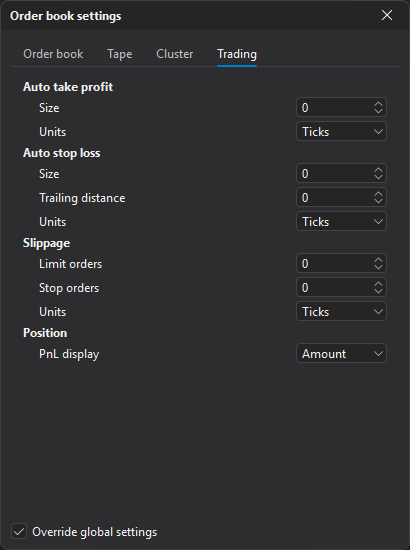
Distances are set in ticks, percent or points. Ticks are counted in order book price steps, taking price compression into account.
The tab has four blocks: Auto take profit, Auto stop loss, Slippage and Position.
Auto take profit
| Parameter | Description |
|---|---|
| Size | Distance from the entry price to the take profit that is placed automatically when a position is opened or reversed. At 0 it is off. |
| Units | Distance unit: ticks, percent or points. |
Auto stop loss
| Parameter | Description |
|---|---|
| Size | Distance from the entry price to the stop loss that is placed automatically when a position is opened or reversed. At 0 it is off. |
| Trailing distance | Distance from the stop loss to the TR trailing marker. If set, the automatic stop loss is placed as a trailing stop right away. At 0 — a regular stop loss. |
| Units | Distance unit: ticks, percent or points. |
Slippage
| Parameter | Description |
|---|---|
| Limit orders | Price offset from the best bid (ask) for the limit order placed by the Buy limit and Sell limit hotkeys. Can be negative. At 0 the order is placed at the best price. |
| Stop orders | Offset of the execution price from the stop price. If greater than 0, a stop-limit order is placed instead of a stop order: for a buy the price is above the stop price by this distance, for a sell — below. At 0 a regular stop order is placed. |
| Units | Distance unit: ticks, percent or points. |
Position
| Parameter | Description |
|---|---|
| PnL display | How the position result is shown on the position panel: Amount — in money (in the quote currency, for MOEX — in rubles), Percent — in percent. |
Last updated on