Chart hotkeys
The Hot keys → Chart group contains commands for the timeframe, scrolling, zooming, working with objects, the view and quickly selecting drawing tools. The keys work in the active Chart window.
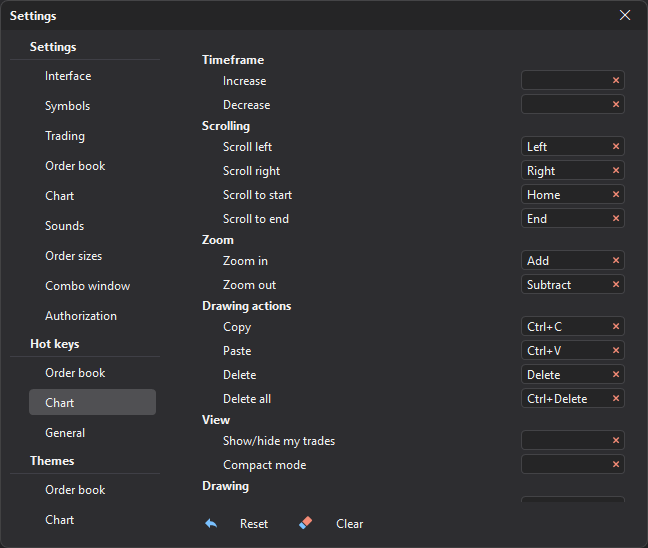
Timeframe
| Command | Default | What it does |
|---|---|---|
| Increase | — | Switches the chart to the next, larger timeframe. |
| Decrease | — | Switches the chart to the previous, smaller timeframe. |
Scrolling
| Command | Default | What it does |
|---|---|---|
| Scroll left | ← | Moves the chart towards earlier bars. |
| Scroll right | → | Moves the chart towards later bars. |
| Scroll to start | Home | Goes to the beginning of the loaded history. |
| Scroll to end | End | Goes to the last bar. |
Zoom
| Command | Default | What it does |
|---|---|---|
| Zoom in | Num + | Stretches the chart along the time axis. |
| Zoom out | Num − | Compresses the chart along the time axis. |
By default, the zoom is changed with the + and − keys of the numeric keypad; in the settings they are shown as Add and Subtract.
Drawing actions
| Command | Default | What it does |
|---|---|---|
| Copy | Ctrl+C | Copies the selected object. |
| Paste | Ctrl+V | Pastes the copied object. |
| Delete | Delete | Deletes the selected object. |
| Delete all | Ctrl+Delete | Deletes all objects from the chart. |
View
| Command | Default | What it does |
|---|---|---|
| Show/hide my trades | — | Shows or hides your trades on the chart. |
| Compact mode | — | Hides or restores the chart scales. |
Drawing
The key selects a drawing tool; the object is then drawn on the chart with the mouse.
| Command | Default |
|---|---|
| Trend line | F2 |
| Horizontal ray | F3 |
| Horizontal line | F4 |
| Vertical line | F5 |
| Channel | F6 |
| Rectangle | F7 |
| Fibonacci retracement | F8 |
| Volume profile | F9 |
| Text | F10 |
Last updated on