Notifications
The Notifications window is the log of triggered alert levels and other terminal alerts: large trades and orders, indicator and footprint alerts, funding. Open it from the Windows → Notifications menu.
It is handy to keep this window in view and open Alerts when you need to set or remove levels.
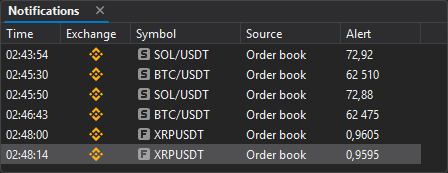
| Column | Description |
|---|---|
| Time | Time the alert was triggered. |
| Exchange | The icon of the symbol’s exchange. |
| Symbol | The symbol with the type icon: S — spot, F — futures. |
| Source | Where the alert came from: Order book, Chart, Footprint, CVD, or Funding. |
| Alert | Price of the triggered level or the alert text. |
What appears in the window
| Event | Source | Text in the Alert column | Where it is turned on |
|---|---|---|---|
| Alert level | Order book or Chart | The level price | Alerts |
| Large trade on the tape | Order book | “Large trade on the tape. Volume: … Price: …” | Threshold — the Tape settings tab |
| Large order in the order book | Order book | “Large volume in the order book. Volume: … Price: …” | Threshold — the Alert group of the Order book tab |
| Indicator alert line | Chart | “Volume: 5000” | Indicators |
| Large trade on the chart | Chart | “Large trade: buy 250 at 86 300 (3 trades, 86 298 – 86 302), 15:47:12” | Large trades |
| Sweep | Chart | “Sweep: buy 120 through 6 levels, 86 298 – 86 303 (9 trades), 15:47:12” | Sweeps |
| Footprint zone | Footprint | “Stacked buy imbalance … (bar 15:47)”, “Price returned to the unfinished auction …” | Zone alerts |
| Closed bar signal | Footprint | “Anomalous volume, bearish delta divergence (bar 15:47)”, “Buying absorbed at the high (bar 15:47)” | Bar signals |
| Past day level | Footprint | “Price reached POC 11.11: 84 150 (10:05:12)” | Past day levels |
| Cluster found | Footprint | “Cluster: volume 1 250 at 86 300 – 86 302 (bars 15:45–15:47, 2 more)” | Cluster search |
| Divergence of price and the cumulative delta | CVD | “CVD: bearish divergence — high 86 500 above 86 450, CVD +1 200 below +3 400 (pivots 16:12 and 16:37)” | The CumulativeDelta indicator |
| Upcoming funding | Funding | “Funding +0.0100% in 05:00.” | Global order book settings, the Funding: alert group |
The funding alert is off by default: turn it on with the Seconds before funding parameter (0 to 3600, 0 — no alert) in the Funding: alert group (Settings → App settings → Order book). The same group has Absolute rate from, % (an alert only at this rate or higher), Sound and Popup message (on by default). The alert comes for the symbols of open order books and watchlists.
Double-clicking a notification row switches to an open order book or chart window with the symbol of that alert.
Context menu
The window’s context menu has the Clear command, which clears the notification history.
Important: Before clearing, make sure you no longer need the notifications.
Configuring columns
The table header has a context menu for configuring columns.
Use the Choose columns item to show or hide columns. The Best fit columns command automatically fits the column widths to the contents.
On the phone and in Telegram
Triggered alert levels also come as a push notification to phones with the JetScalp app and to Telegram if a chat is linked — see Cloud alerts and Telegram notifications.