Global order book settings
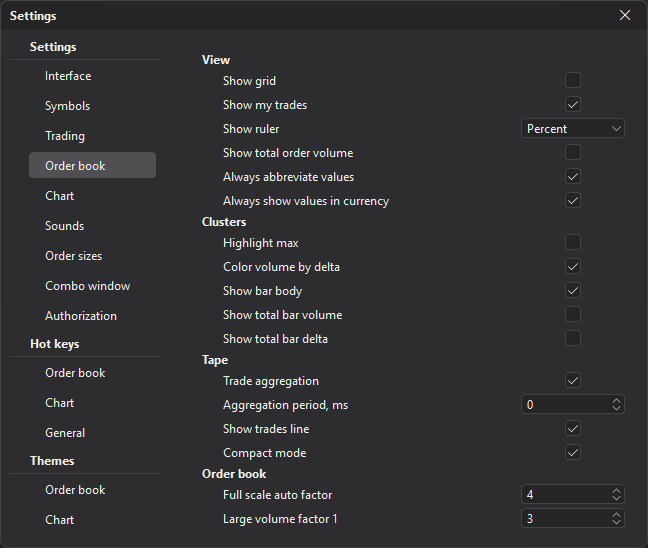
The Order book section sets global settings that apply to all new and already open order books, unless overriding the global settings is enabled for a specific window.
| Group | Description |
|---|---|
| View | Grid, own trades, the ruler (the Show ruler parameter: None, Percent, Points or Ticks), total order volume, Always abbreviate values and Always show values in currency. |
| Clusters | Highlighting of maximums, coloring by delta, display of the bar body, volume and delta. |
| Tape | The tape inside the order book: trade aggregation, aggregation period, trade line, Compact mode and Smooth tape — a new trade slides in from the right and the tape glides into place (both on by default). |
| Order book | Full scale auto factor (4 by default), Large volume factor 1 and 2 (3 and 6 by default), highlighting of prices at grid levels, the mouse price compression step and Auto-centering (on by default). |
| Funding | When to show the funding chip of a perpetual future on the info panel. |
| Funding: alert | An alert shortly before a funding payment. |
Funding
| Parameter | Description |
|---|---|
| Show | Always (default), By thresholds or None. |
| By thresholds: rate from, % | For the By thresholds mode: the chip is shown if the absolute rate is at least this value. |
| By thresholds: minutes to funding | For the By thresholds mode: the chip is shown if no more than this number of minutes is left until the payment (from 0 to 1440). 0 — no such condition. |
In the By thresholds mode the chip is shown only when both conditions are met.
Funding: alert
The terminal can warn you in advance about a funding payment for symbols open in order books or in the Watchlist. An alert comes once for each payment.
| Parameter | Description |
|---|---|
| Seconds before funding | How many seconds before the payment to alert: from 0 to 3600. 0 (default) — no alert. |
| Absolute rate from, % | Alert only about payments with an absolute rate of at least this value. 0 — about all of them. |
| Sound | The alert sound — one of the alert sounds from the Sounds section. |
| Popup message | Besides the sound, shows a “Funding” popup message with the symbol name, the rate and the time left until the payment. On by default. |
Each alert is written to the Notifications window with the source “Funding”.
Last updated on