Interface
The Interface section sets the language and appearance of the terminal, the behavior of the main window and tabs, and the fonts of the order book and chart.
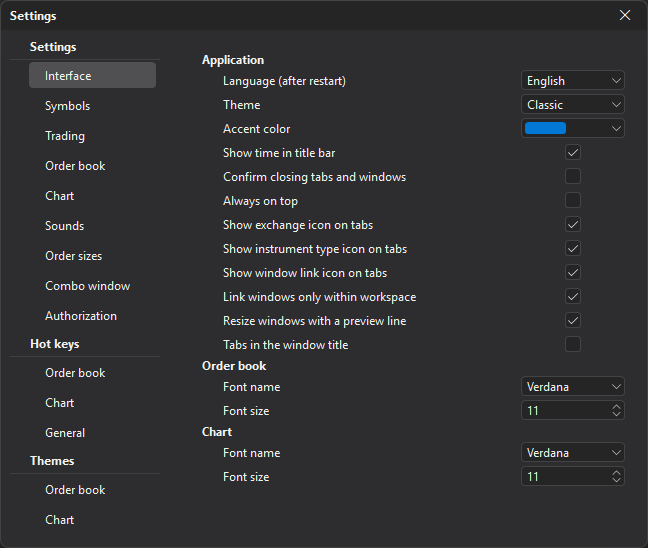
Application
| Parameter | Description |
|---|---|
| Language (after restart) | The interface language: System (Russian if Windows or macOS is in Russian, otherwise English), Русский or English. The new language applies after you restart the terminal. |
| Theme | The theme of the terminal windows: Dark, Light or Classic (default). The colors of the order book and chart are set separately — in the Themes section. |
| Accent color | The highlight color of interface elements: ten preset colors (blue by default) or Custom color picked on a color wheel. The shades of the accent color are adjusted to the selected theme. |
| Show time in title bar | Shows the current time at the top of the terminal. |
| Sync settings with other computers | Sends settings changes to the other computers where you sign in to the terminal with the same login, and applies the changes made on them. See Settings sync. The parameter is set on each computer separately and is not synced itself. When you turn it on, the terminal asks whether to take the settings from the server or send this computer’s settings to the server. Off by default. |
| Confirm closing tabs and windows | Asks for confirmation before a window is closed with the cross on its tab. Off by default. Workspace tabs at the bottom of the main window are always closed with confirmation. |
| Always on top | Keeps the terminal window on top of other Windows windows. |
| Show exchange icon on tabs | Shows the symbol’s exchange icon on the window tab (Exchange icon on a window tab). |
| Show instrument type icon on tabs | Shows the symbol type icon on the window tab. |
| Show window link icon on tabs | Shows the link color square. With the parameter off, the link palette cannot be opened from the tab. |
| Link windows only within workspace | Windows of one link color switch together only within their workspace; with the parameter off — in all of them. On by default. |
| Resize windows with a preview line | While you drag the splitter between windows, only a line is shown, and the windows resize when you release the mouse. With the parameter off, the windows resize right away, following the mouse. On by default. |
| Tabs in the window title | Shows the workspace tabs in the title bar of the main window and workspace windows instead of a strip at the bottom (Tabs). Off by default. |
Order book and Chart
| Parameter | Description |
|---|---|
| Font name | The main text font of the order book or chart. Verdana by default. |
| Font size | The main text size of the order book or chart: from 8 to 30, 11 by default. |
Last updated on