Order sizes
The Order sizes section sets the default order sizes of the order book: common ones for all exchanges or the exchange’s own ones.
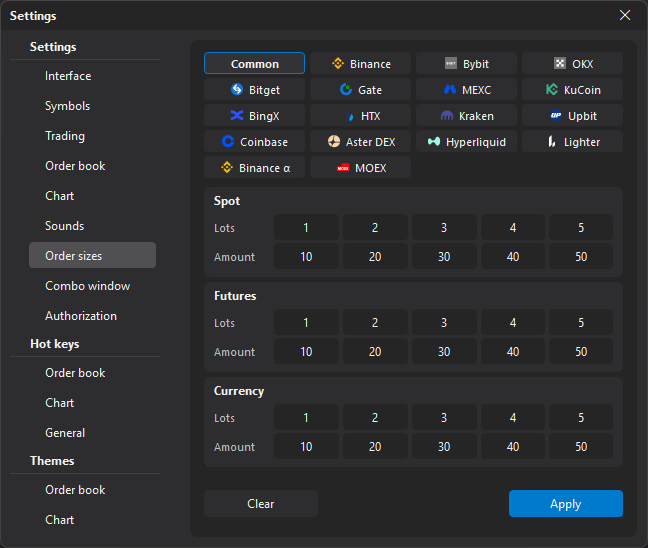
Common and own sizes
At the top of the section are the Common button and buttons for the terminal’s exchanges. Select what to set up:
- Common — sizes that apply on all exchanges that have no own ones;
- an exchange — the sizes of this exchange. Exchanges that have own sizes for at least one market are highlighted.
For the selected exchange each market has a switch:
- Common — the exchange’s market uses the common sizes. The fields show them, but you cannot edit them here;
- Own — the exchange’s market has its own sizes. When you switch, the common sizes are copied into them and then changed separately. To return to the common sizes, select Common again — the market’s own sizes are removed.
Markets and fields
Sizes are set separately for the Spot, Futures and Currency (the MOEX currency market) markets. If the selected exchange has no such market, it is not shown on the page.
Each market has two sets of five fields — order sizes 1–5:
- Lots — the size in lots (symbol quantity), for the Lot mode in the order book;
- Amount — the size in the quote currency, for the $ mode in the order book.
Buttons
| Button | Description |
|---|---|
| Clear | Clears the sizes you are setting up now: the common ones (all markets) or the own sizes of the selected exchange. |
| Apply | Saves the changes and applies the sizes in open order books right away. |
The changes are also saved without Apply — when you go to another section or close the settings window. But the sizes in order books that are already open do not change then.
Important: Before placing an order, check the active order size mode in the order book: Lot or $ (quote currency). The same number means a different order size in different modes.