Diagnostics
The Diagnostics window shows the JetScalp technical log. The log shows terminal events: startup, server requests, data loading, connection errors, order errors and other service messages.
To open it, select Settings → Diagnostics.
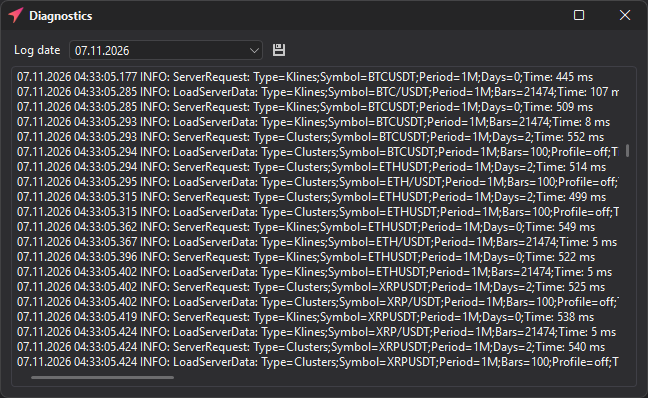
| Element | Description |
|---|---|
| Log date | The date for which the log is shown. The list has only the last 5 days. |
| Log area | A list of events with the time, message level and event text. |
| Save to file | Saves the shown log to a file to send to support. The default file name is JetScalpLog.log. |
When the window opens, the terminal deletes logs older than 5 days. If you may need the log of a day later, save it to a file in advance.
What the log may contain
The log contains technical messages about the terminal’s operation. It is not intended for day-to-day trading but for troubleshooting.
| Record type | Example situation |
|---|---|
| Terminal startup | JetScalp version and startup time. |
| Server requests | Loading candles, clusters, history and other data. |
| Market data | Requests and updates for symbols. |
| Connections | Successful connection, disconnection, connection error. |
| Trading operations | Order errors, connection responses, technical trading events. |
| Performance | Request execution time in milliseconds. |
Important: The log may contain technical information about symbols, connections and requests. Do not make the log publicly available if it may contain sensitive data.
What to send to support
If an error occurs, send not only a description of the problem but also data that will help reproduce it quickly:
- The date and exact time of the error.
- The connection name.
- The symbol and market.
- What you were doing before the error.
- A screenshot of the window where the problem occurred.
- The saved log for the relevant date.
If the error is related to an order, also specify the side, order type, price, volume, account and order status in the Orders table.
Where to send the report and the log is described in Feedback. Answers to common problems are in the FAQ; where the log files are stored is in Installation and updates.