JetScalp mobile app
JetScalp for iPhone, iPad and Android: quotes, an order book with tap trading, charts and your portfolio on a phone or tablet. It uses the same account as the website and the terminal, and quotes, order books and trading work without one too.
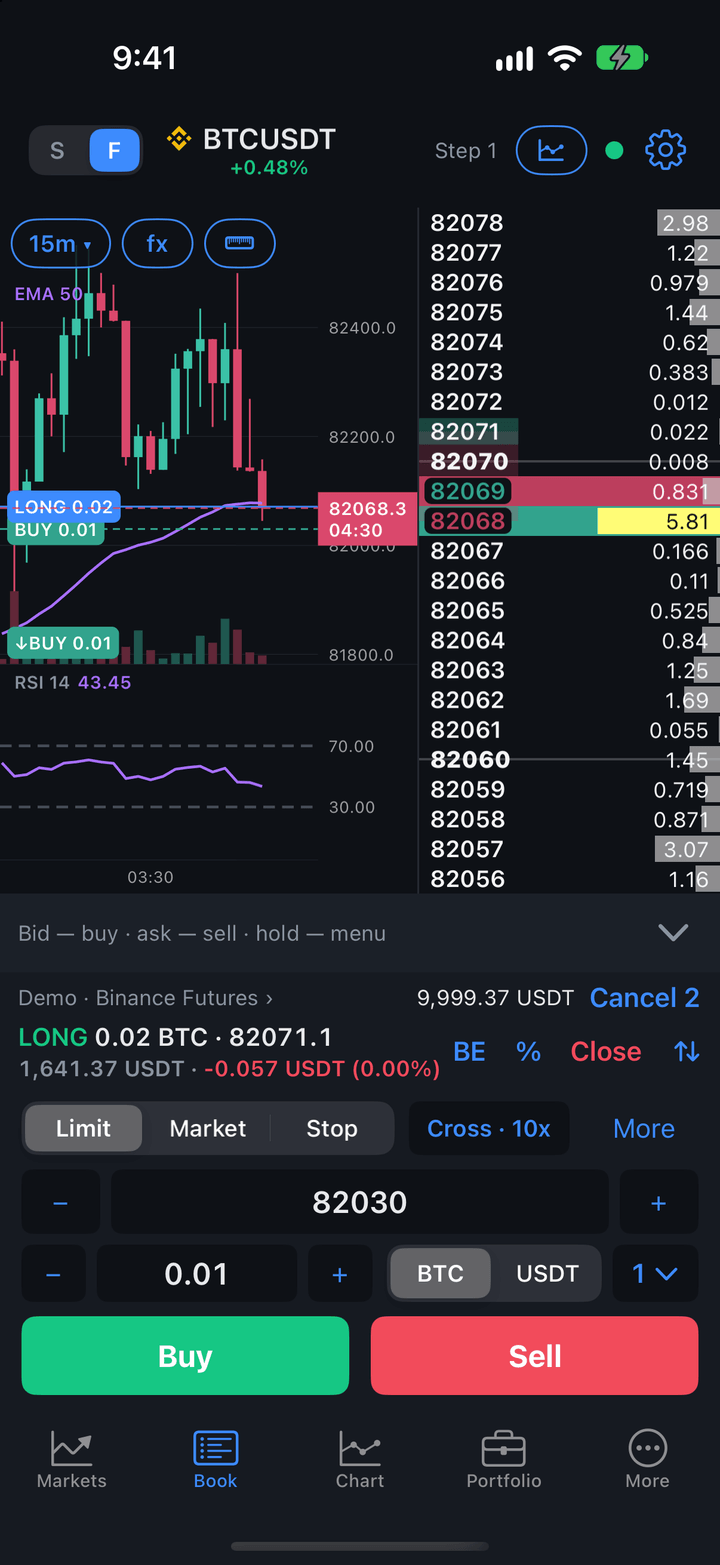
What the app does
- Markets — symbol lists with live quotes, favorites, sorting and symbol search across exchanges.
- Order book — orders with a tap on a price, an order panel with five order sizes, stop loss and take profit, clusters and the tape.
- Chart — timeframes, indicators, drawings and a ruler; orders, stop loss and take profit are shown right on the chart.
- Portfolio — positions, orders, trades and account funds, closing positions and canceling orders, statistics.
- Connections and accounts — crypto exchanges with API keys, DEXs through a wallet (WalletConnect), Moscow Exchange brokers and demo accounts with no keys and no risk.
- Alerts and notifications — price alert levels and push notifications even while the app is closed; an open position on the Lock Screen.
- Tablet — on iPad and Android tablets the order book sits next to the chart; in landscape there are three columns with the portfolio, several quote lists and the Screener tab.
The tabs at the bottom of the screen are Markets, Book, Chart, Portfolio and More. On a tablet there is also a Screener tab after Markets.
The app speaks English and Russian: the language follows the system or is chosen in the settings.
Do you need an account
Crypto exchange quotes, order books and charts are available right after installation, with no account and no keys. You can trade on a demo account or through an exchange connection.
Signing in to your JetScalp account adds:
- the symbol list and chart history from the JetScalp server;
- alerts shared by all your devices, and push notifications while the app is closed;
- Moscow Exchange broker connections;
- the screener on a tablet.
See Account and sign-in for details.
Sections
- Installation — TestFlight for iPhone and iPad, an APK for Android, the first launch.
- Account and sign-in — signing in, signing up in the app, password reset, signing out and deleting the account.
- Markets — symbol lists, favorites, sorting and search.
- Order book — placing and canceling orders, stop loss and take profit.
- Chart — timeframes, drawings, indicators.
- Portfolio — positions, orders, trades, closing a position.
- Connections and accounts — exchange keys, wallets, real and demo accounts.
- Alerts and notifications — alerts, push notifications, the position on the Lock Screen.
- Tablet — iPad and Android tablet layouts, the screener, keyboard and mouse.
- More and settings — the More screen, app settings, app lock, report to support.
The desktop terminal documentation is in the Terminal section.