Assets
The Assets window shows the state of funds by connection and account. Use it to monitor the balance, free funds, and locked funds.
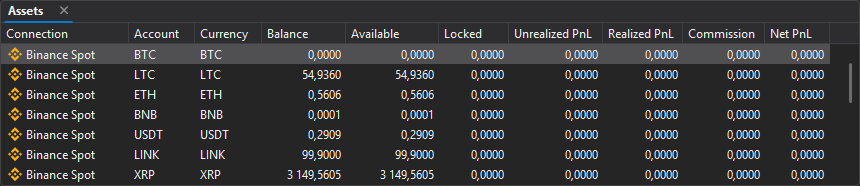
Columns
| Column | Description |
|---|---|
| Connection | Trading connection. |
| Account | Account. |
| Currency | Currency or asset. |
| Balance | Total balance of the asset. |
| Available | Available for trading or withdrawal. |
| Locked | Locked in orders or operations. |
| Unrealized PnL | Unrealized result. |
| Realized PnL | Realized result. |
| Commission | Fee. |
| Net PnL | Total financial result. |
Context menu
Only Vataga connection asset rows have a context menu: right-click an asset row.
| Command | Description |
|---|---|
| Add to pool | Transfers part of the account profit to the Vataga pool. See Topping up the pool for details. |
Balance, free, and locked
| Metric | Description |
|---|---|
| Balance | Total amount of the asset in the account. |
| Available | Part of the balance available for new operations. |
| Locked | Funds held by active orders or other operations. |
If an order cannot be placed due to insufficient funds, check the Assets window first. The available balance may be lower than the total balance because of locked funds.
When trading actively, watch not only the total balance but also the free balance. If a significant part of the funds is locked, new orders may be rejected.
Last updated on